ERbuddy
Improving Patient-Caregiver Communication for Healthcare Management
My Role
Research & Insights lead
UX Designer
Project Management
Tools
Figma, Miro, Google Sheets, Zoom
Responsibilities
Developed research plan and interview script, recruited participants, moderated 7 interviews, synthesized data through affinity mapping, facilitated client communications, designed visuals i.e. lo-fi & hi-fi designs
Client

The context
Tl;dr
ERbuddy is a personal healthcare management platform designed for patients and their caregivers helping families manage chronic conditions and access critical health information.
However, ERbuddy fell short in one critical area: communication. Families weren’t using the platform to stay connected. They were still relying on texts, phone calls, and even handwritten notes to coordinate care.
We partnered with Pratt Institute’s DX Center and uncovered the root of this disconnect through rigorous in-depth research and 0-1 product development to design solutions that ultimately improved communication between patients and caregivers.
The Goals
Scoping Project Goals
After reviewing early user feedback on their beta mobile app, we arrived at a final scope in mind with the client and set our to uncover greater insight into 3 key areas:
Centralized Information Access
Ensure essential health information surfaces at the right time
Strengthen Two-Way Communication
Enable Clear and secure communication amongst patients and caregivers
Improve Usability and Accessibility
Design an intuitive and accessible interface that minimizes friction for all users
Scoping Challenges: What I advocated for
The client initially wanted us to redesign the entire app, including multiple user flows that involved data privacy and medical compliance considerations.
With limited time and a student team, I advocated for researching and identifying an existing market gap where ERbuddy had a clear, competitive advantage, which is how we landed on Patient-caregiver communication as our core focus.
By narrowing our scope, we were able to deliver a high-quality MVP with depth and intention, rather than making surface-level improvements across the entire platform.
Final Designs
Designing Outcomes to Support Patients and Caregivers
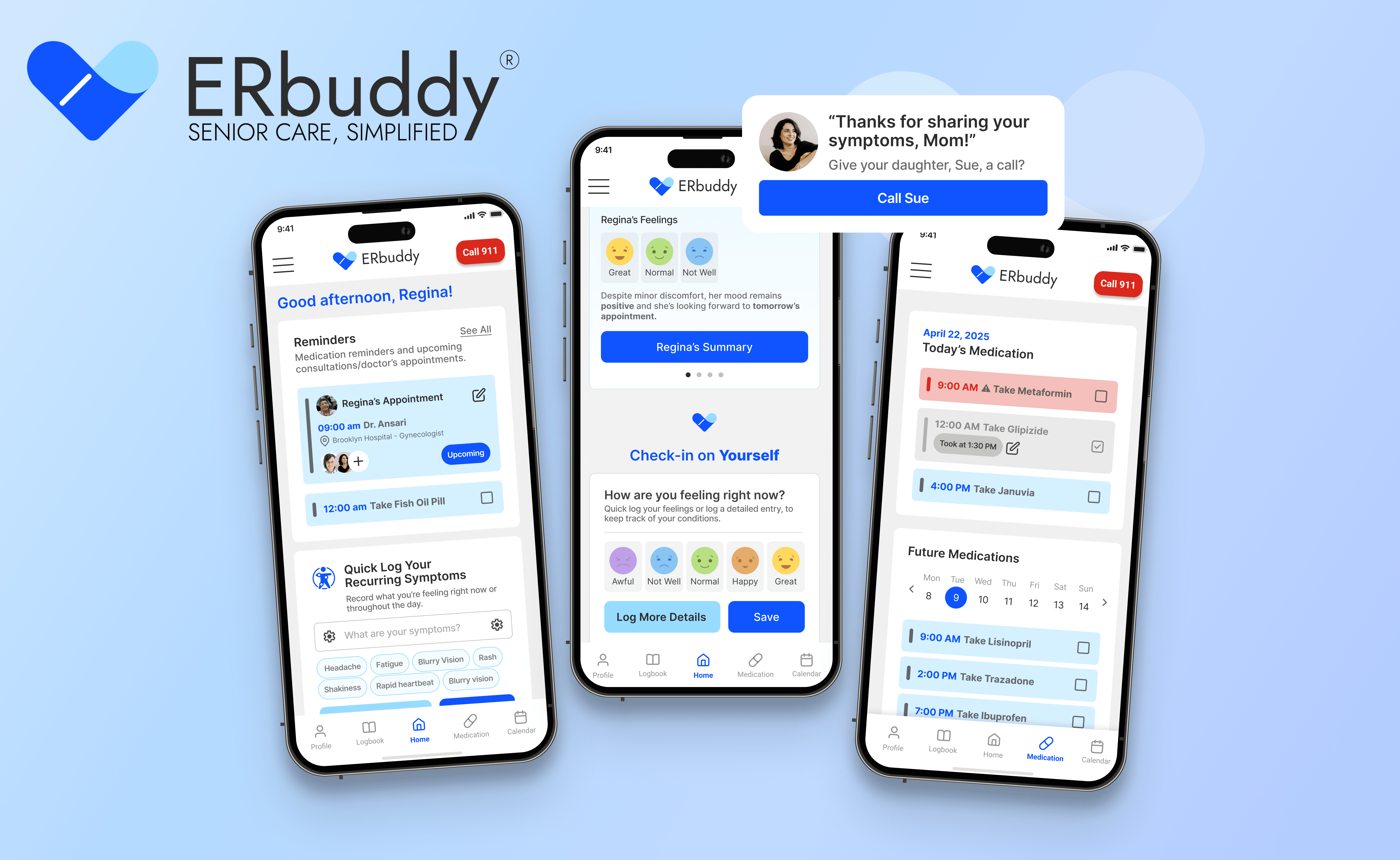
In-depth research and 0-1 product development informed the final designs of ERbuddy, introducing features that centralize critical information for patients and caregivers across varying roles, alongside a dedicated symptoms and feelings logbook for patients.
The result is a unified experience that helps both groups manage care more confidently—reducing stress through streamlined access to essential health information and seamless communication.
How did we get here exactly?

Research
I defined key questions and directed research activities
For this project, it was extremely important that we took time to understand the overall healthcare landscape and the patient-caregiver dynamic. Our team conducted desk research and competitive analysis to build our background knowledge.
Our research revealed a gap in at-home care, providing an opportunity to expand into untapped markets.
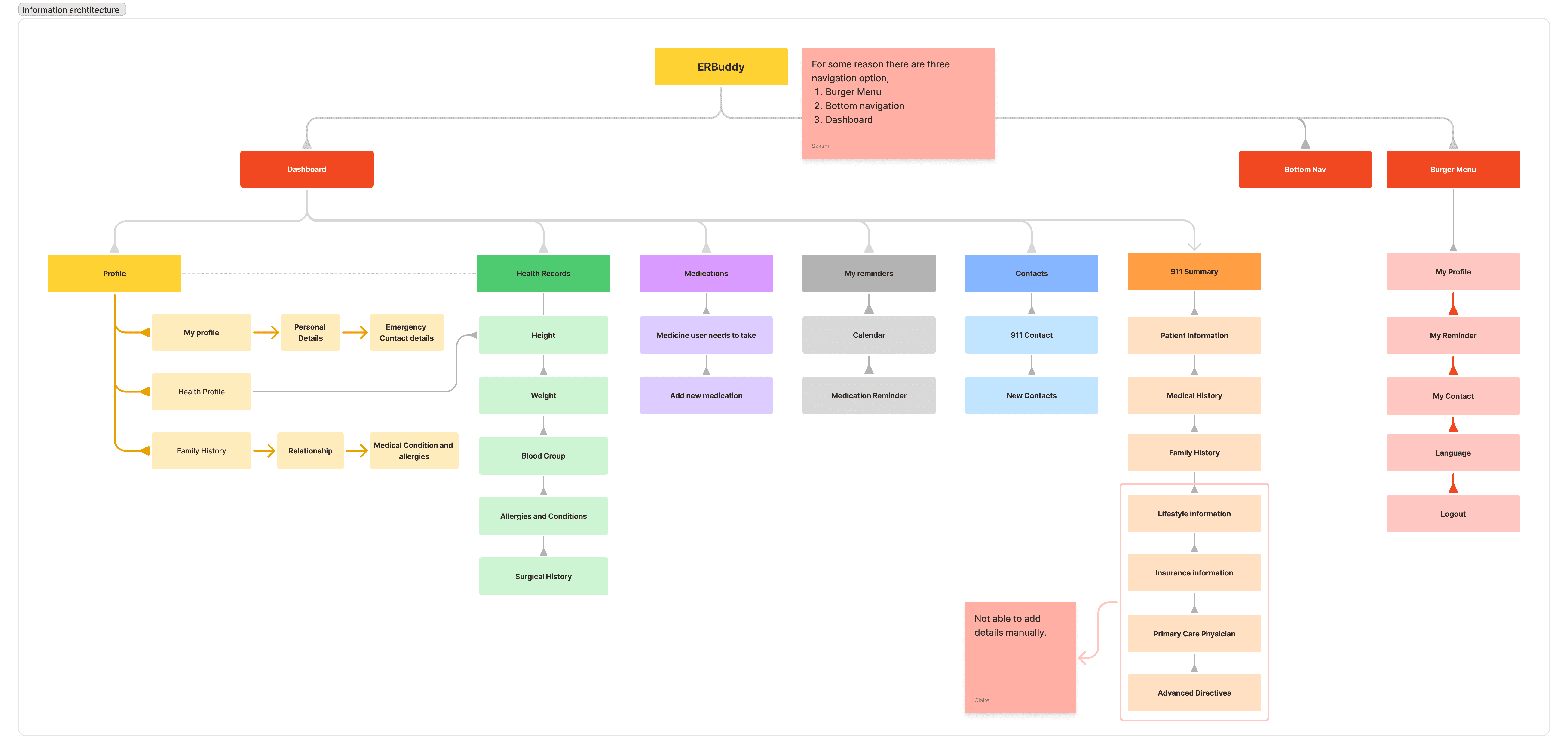
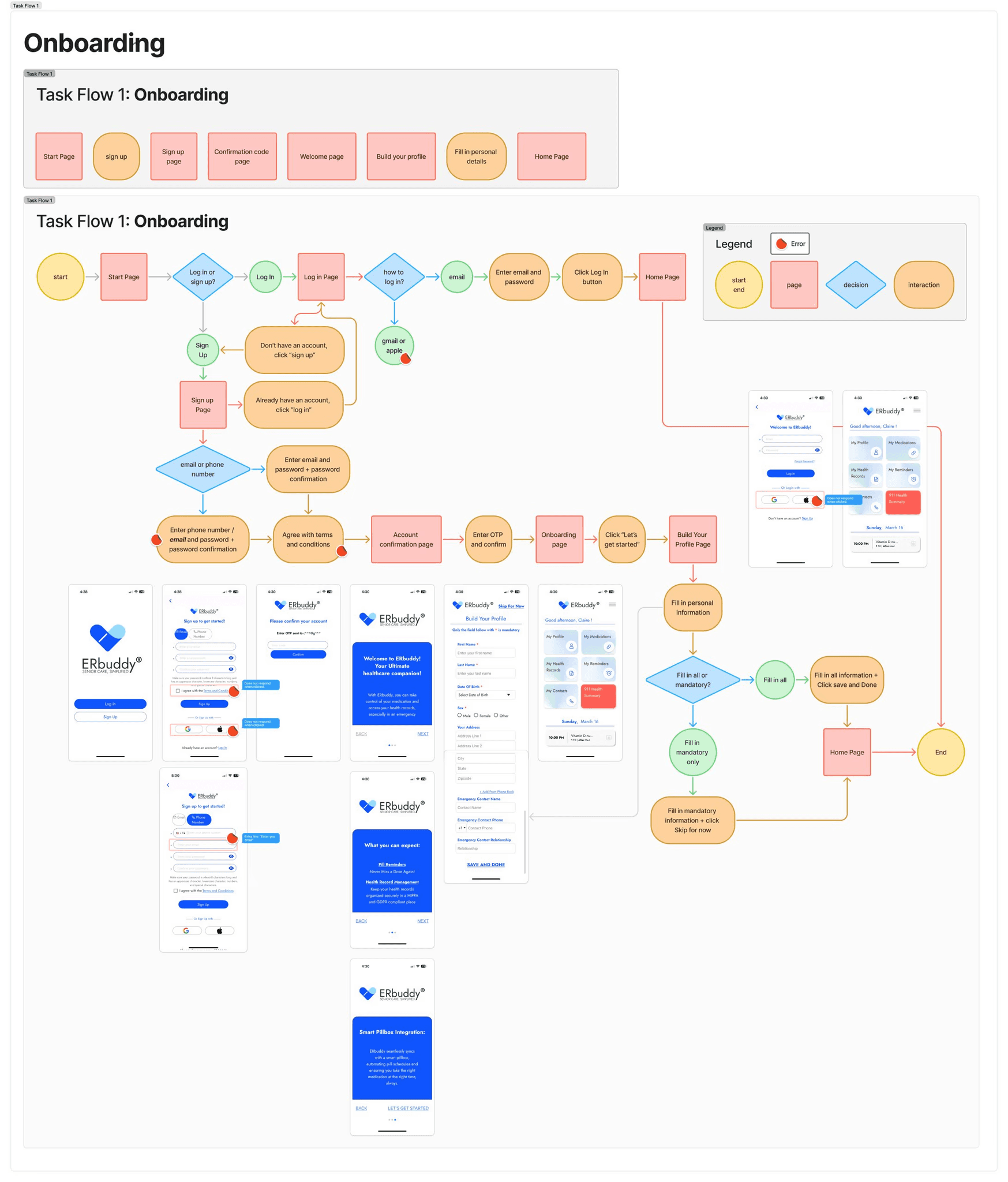
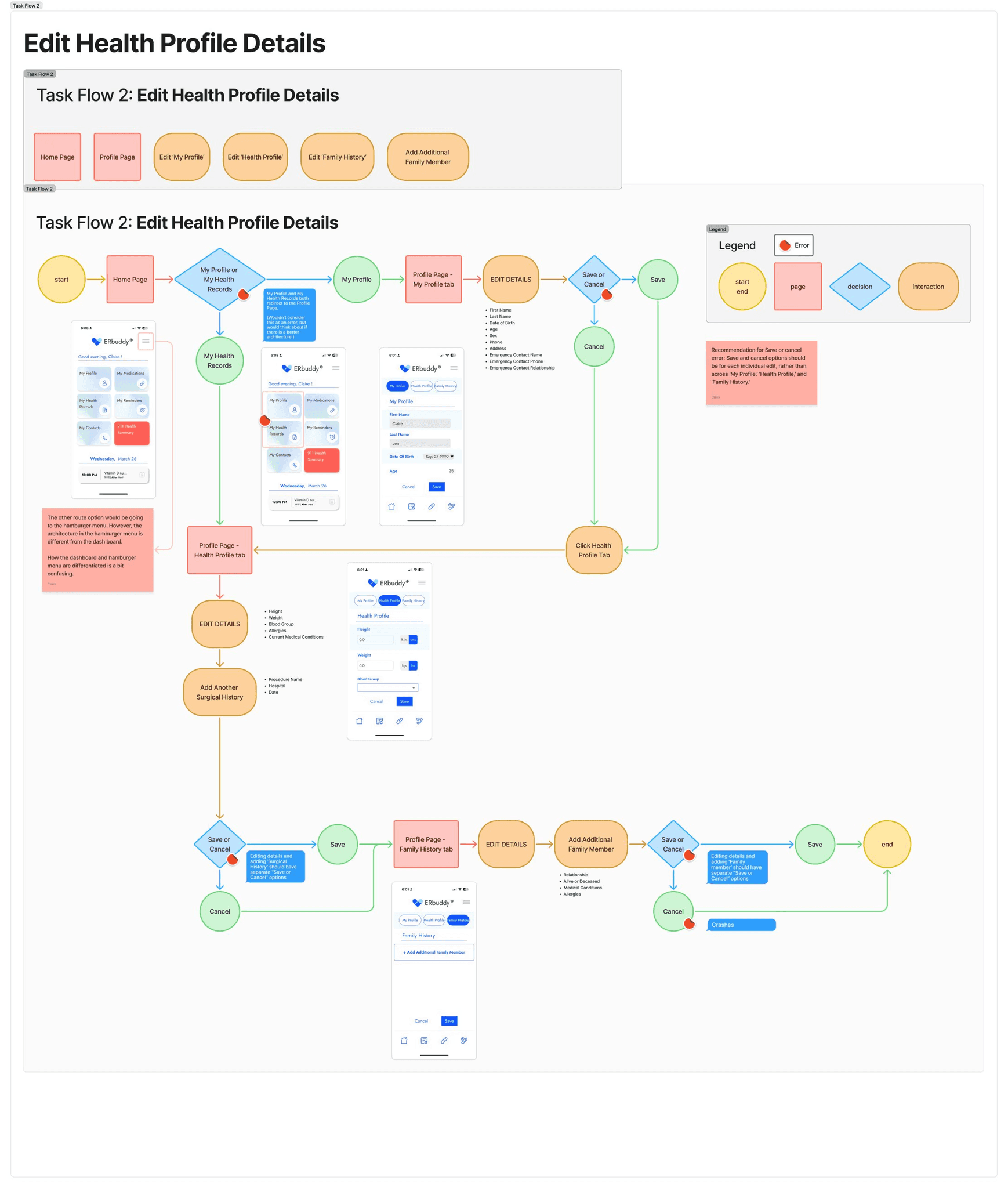
We leveraged what we learned from the competitor analysis to then conduct an app audit for ERbuddy to align with business needs as well. Namely, we reviewed the current information architecture and defined four existing task flows:
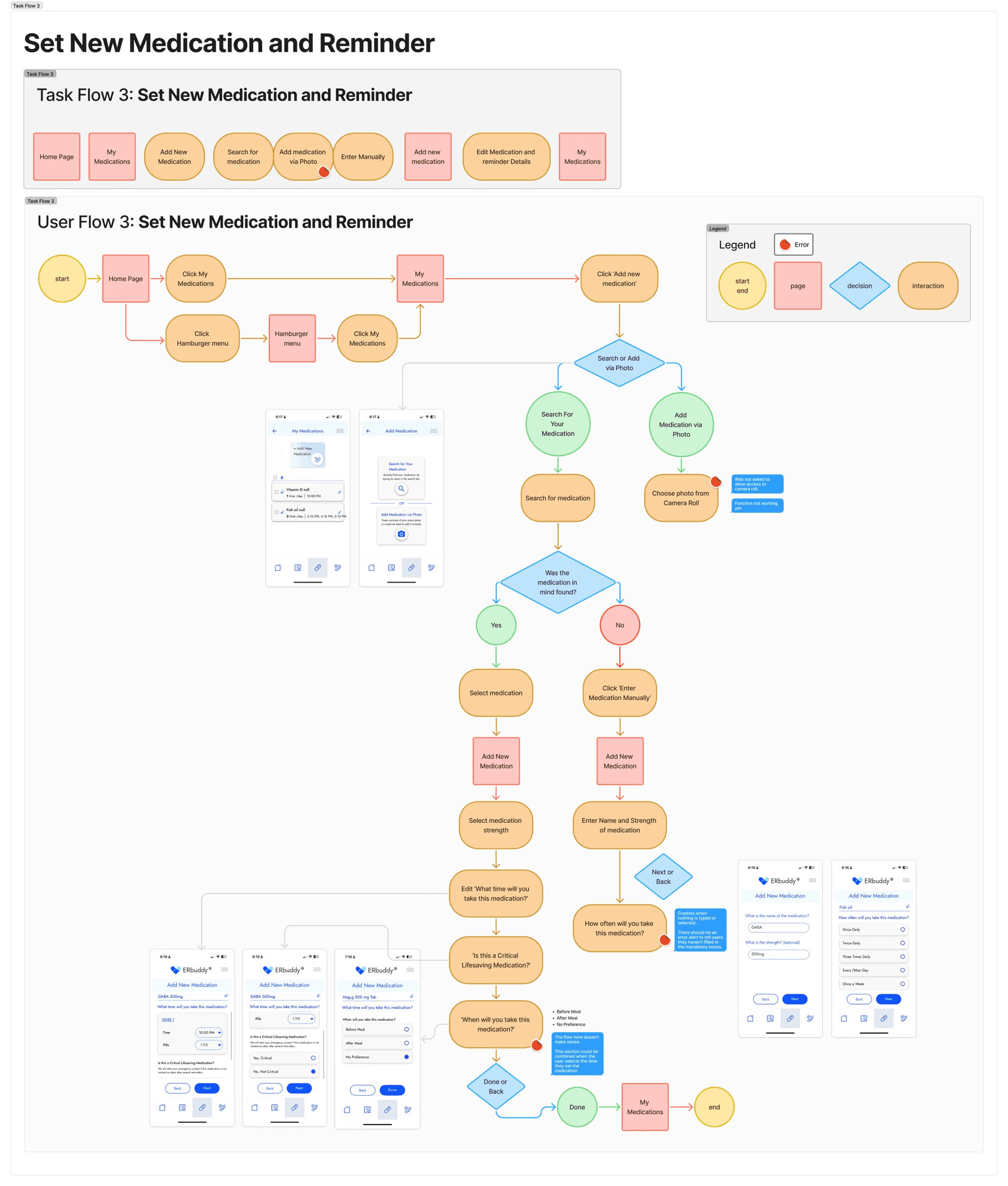
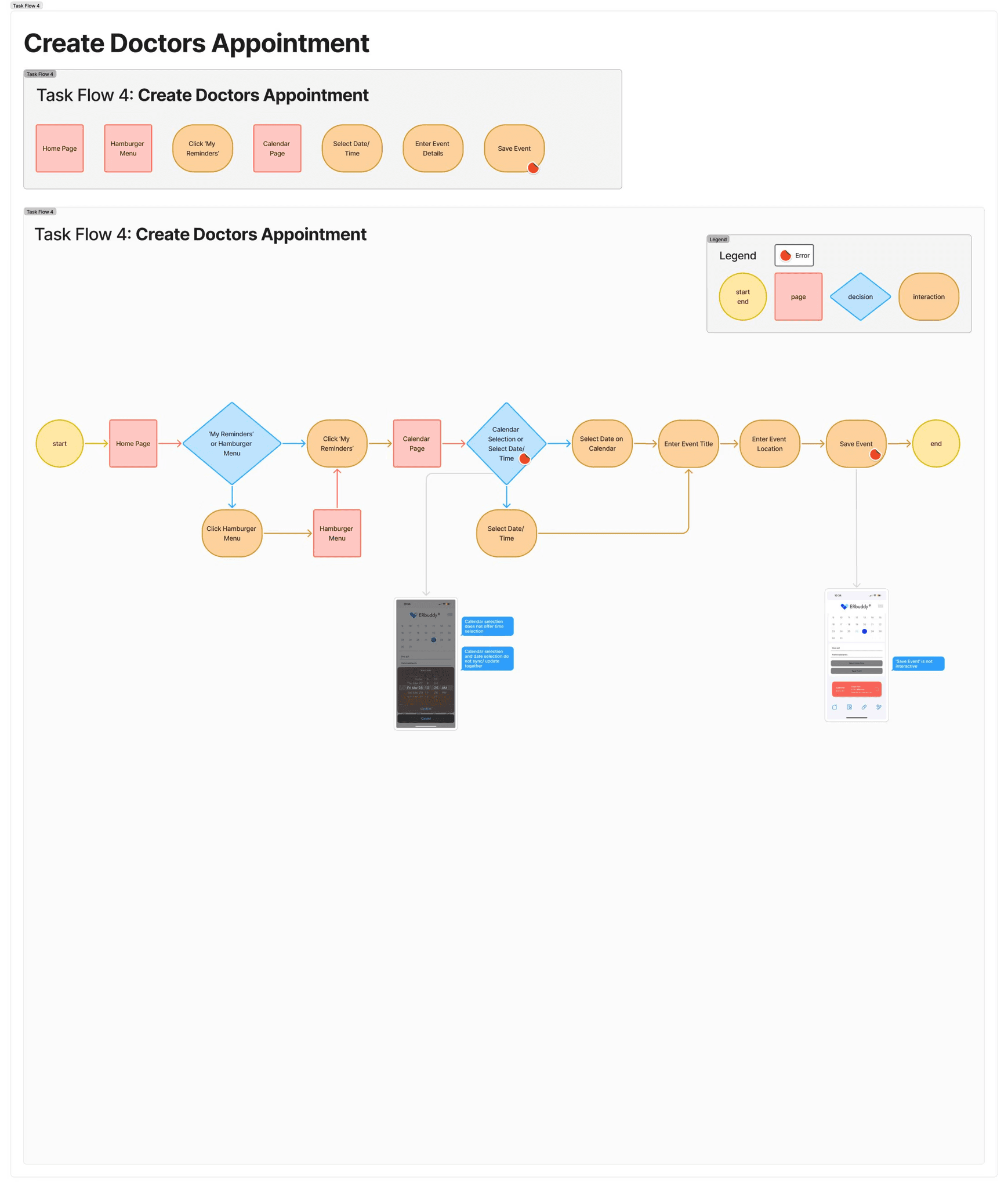
To get a deeper dive on the landscape of healthcare management, we conducted 8 structured interviews to:
1
Understand how patients and caregivers currently communicate with each other
2
Identify pain points with caregiving, medication management, and tracking medical records
Following the interviews, we were able to organize the qualitative data into an affinity map and group our findings based on common themes, revealing larger patterns:
Managing health alone can be daunting. Gaps in medical history access can make decision-making stressful and difficult.
Assessing urgency is difficult and stressful.
Patients want a way to keep track of their own health while having caregivers involved for assistance.
Caregivers want a centralized system so that information is not scattered and is shared with all related users.
From this foundation, we developed empathy maps and personas that captured not just demographics, but the emotions, frustrations, and goals of our users.
These tools became touchstones throughout our process, guiding us to design with clarity, compassion, and purpose.
Meet the users we designed for…
ERbuddy's target audience are senior patients and caregivers.

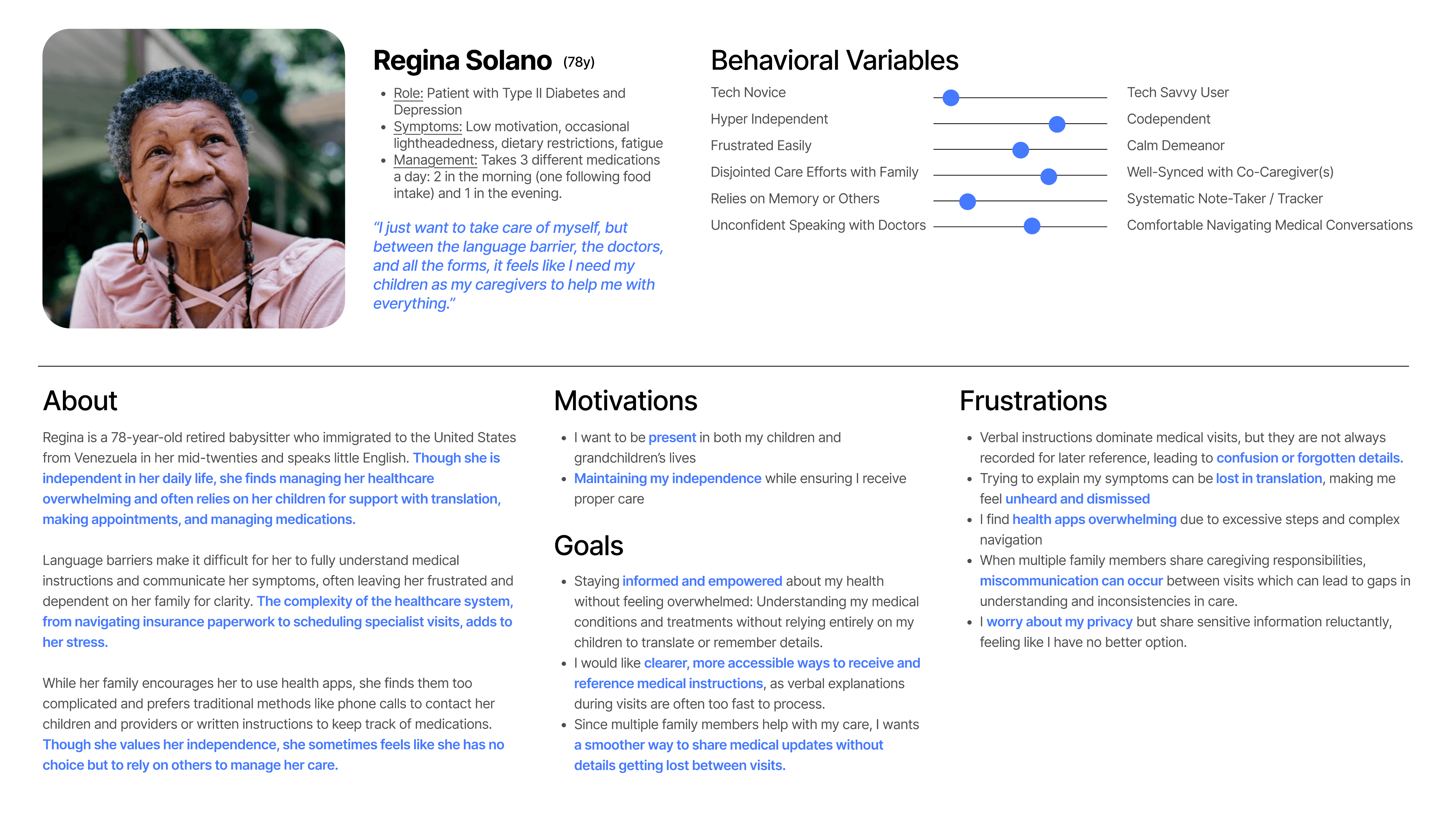
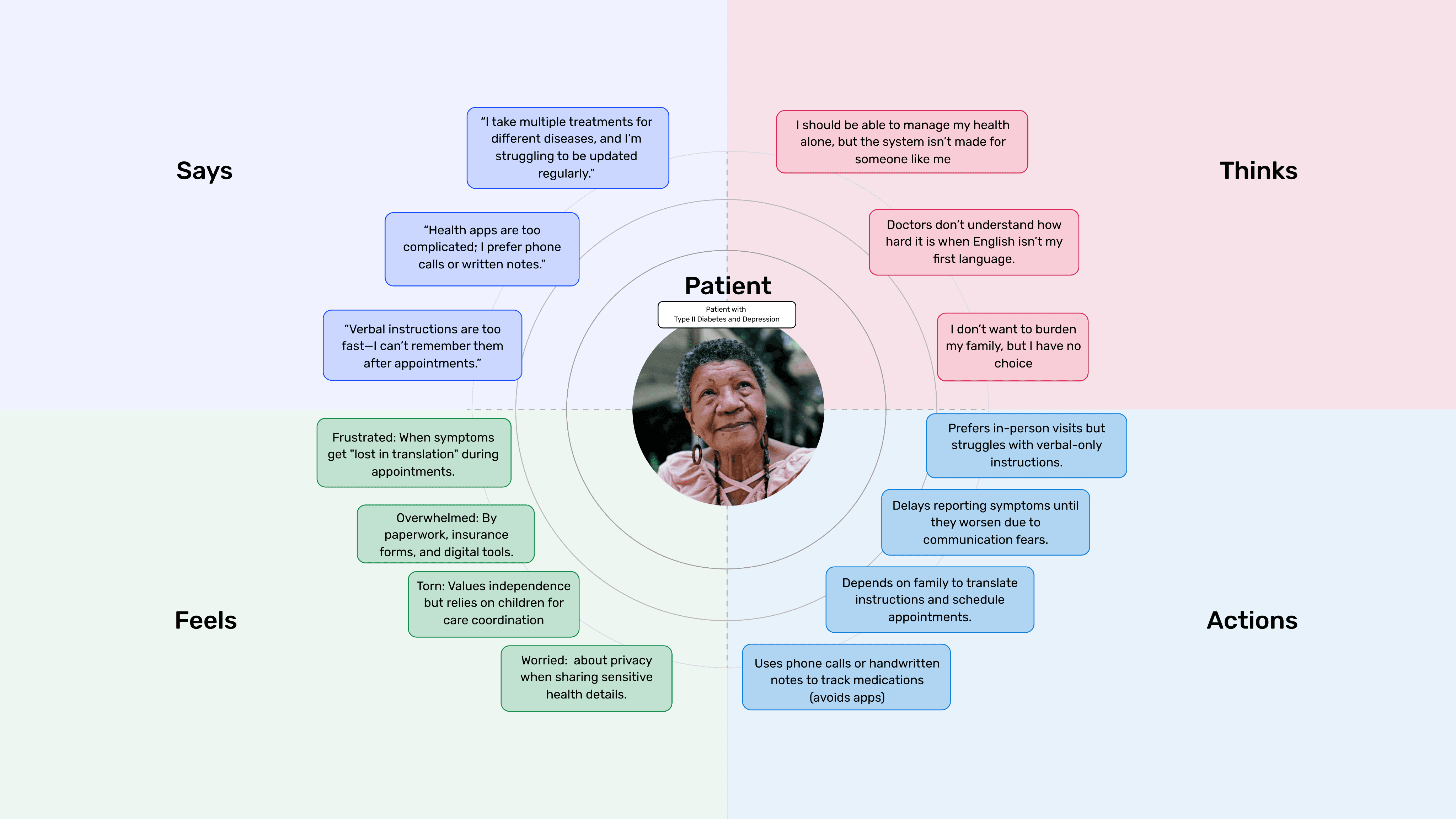
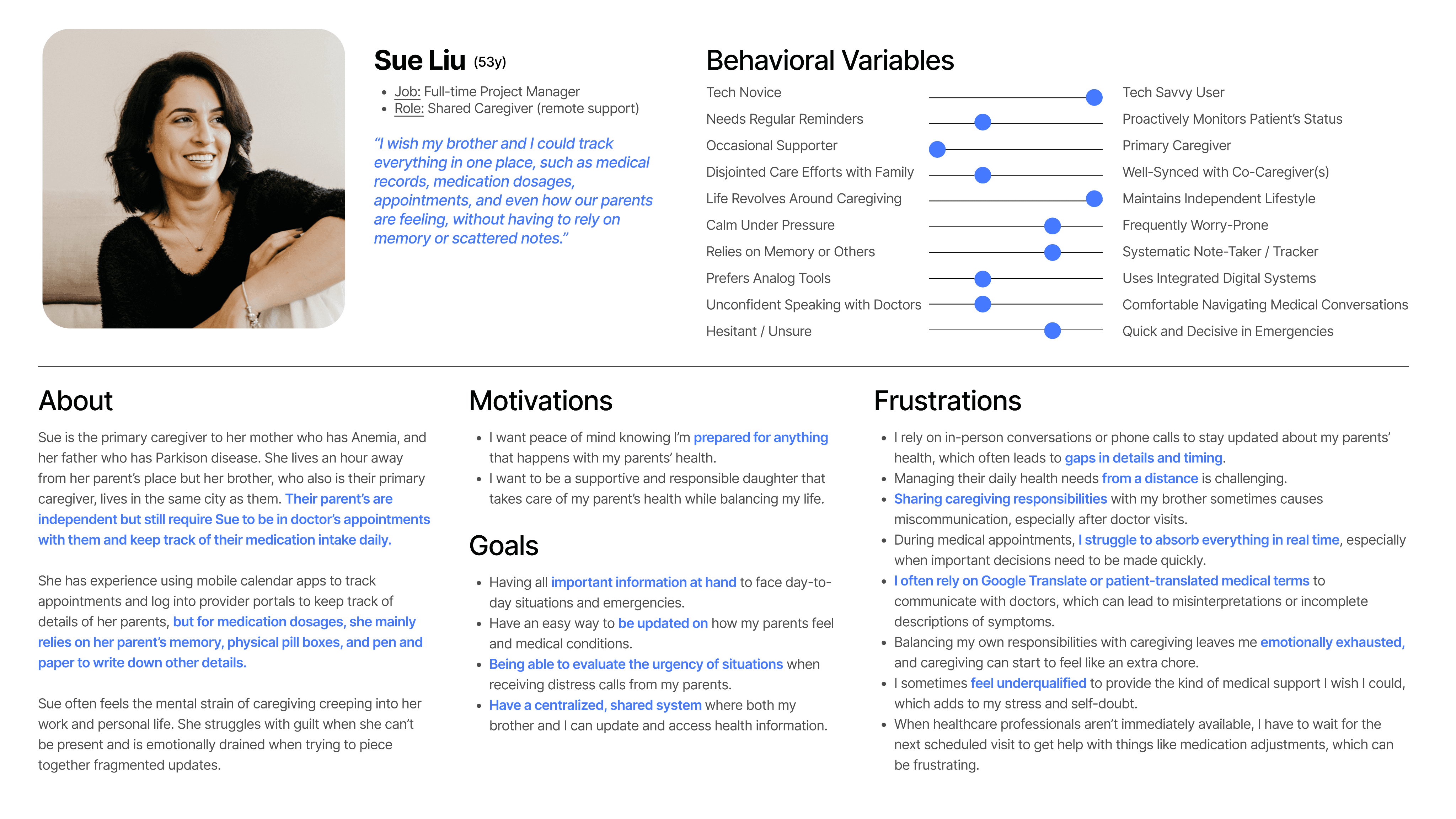
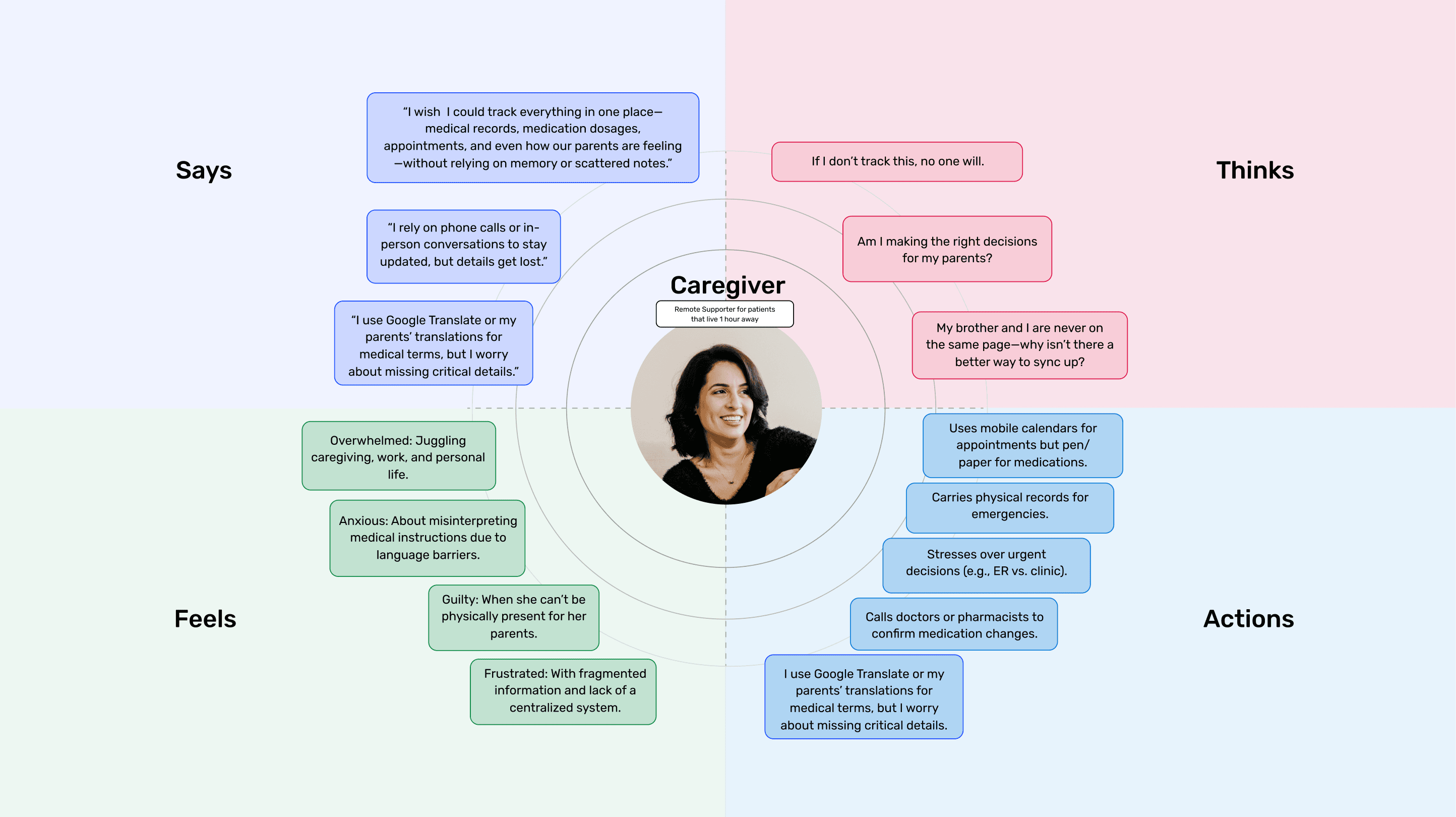
Click cards for better viewing
Defining solutions
Bridging insights to explore opportunities
We identified the need for new solutions to fully fulfill user needs. We identified 3 main design challenges as goals based on our research insights:
How Might We make it easier for caretakers to assess all the medication data and appointments at one place?
How Might We help multiple caregivers sync information they acquire from patients and PCPs so that they are on the same page?
How Might We encourage patients to keep track of and log how they feel mentally and physically so that their caregivers are more aware of their status?
In order to focus our efforts on an MVP, we applied the MoSCoW Method, which led us to prioritize 3 proposed features.
These received positive feedback from the client and led us to moving forward with the first two features.
Role-Switching
Allow users to toggle between patient and caregiver views
Symptoms and Feelings Log
Enable patients to track and share their physical and mental status
Note-taking during doctor's visits
Help users capture and share visit information
Ideating solutions
Iterating and developing solutions
Having defined the feature solutions, we took the opportunity to explore designs through low-fidelity sketching and wireframing. We focused on conceptual thinking and core elements to quickly visualize ideas and bridge into more detailed designs later.
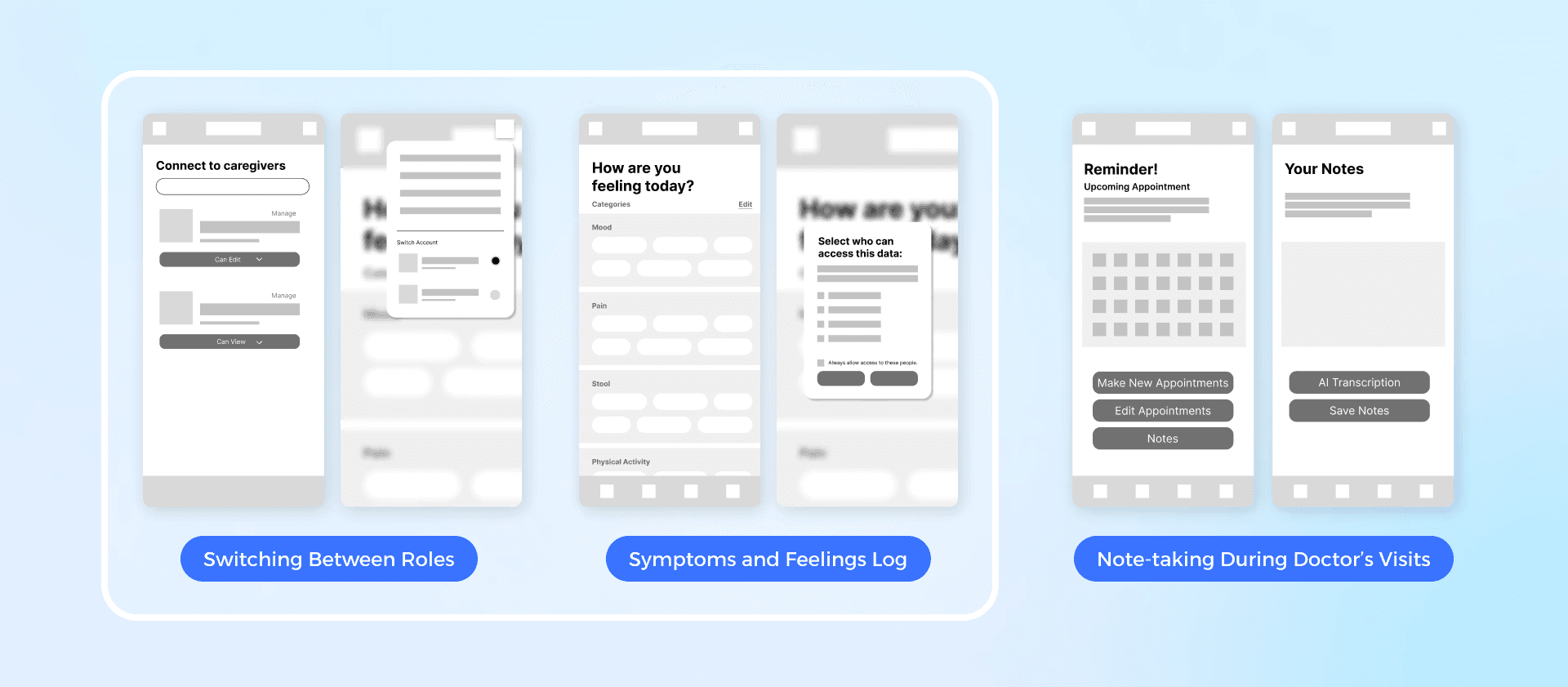
While the third feature was beyond developer scope at the time, I explored AI features to address this with the client in later consultancy work.
Designing Erbuddy
I created key screens and prototyped one main feature
We approached the solutions top-down and ensured that the client could implement our designs in the future by creating an updated information architecture and task flows that clearly identified all screens involved.
Following collaborative sketching and discussion, we aligned on the screen structure, then I designed key screens for the logbook feature in medium fidelity. We wireframed and prototyped just enough to test key functionality so that we could gather feedback early and iterate efficiently.
Select for closer view
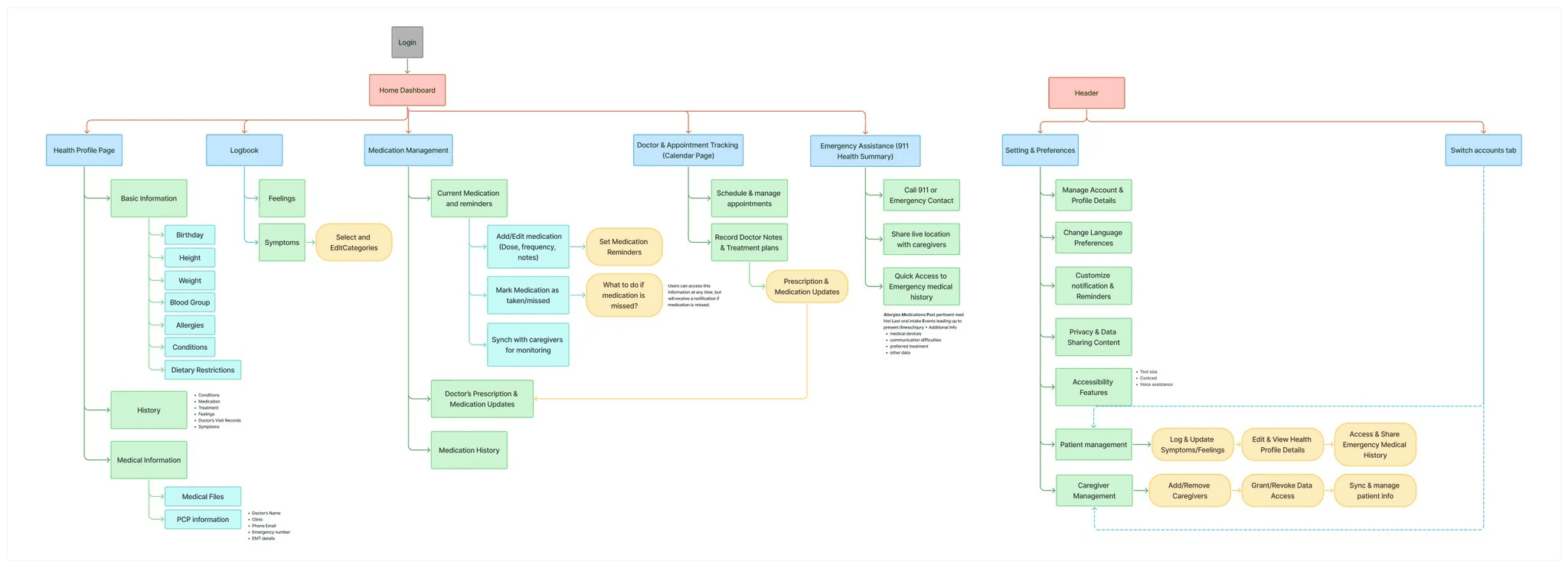
Overarching information architecture of the new ERbuddy app
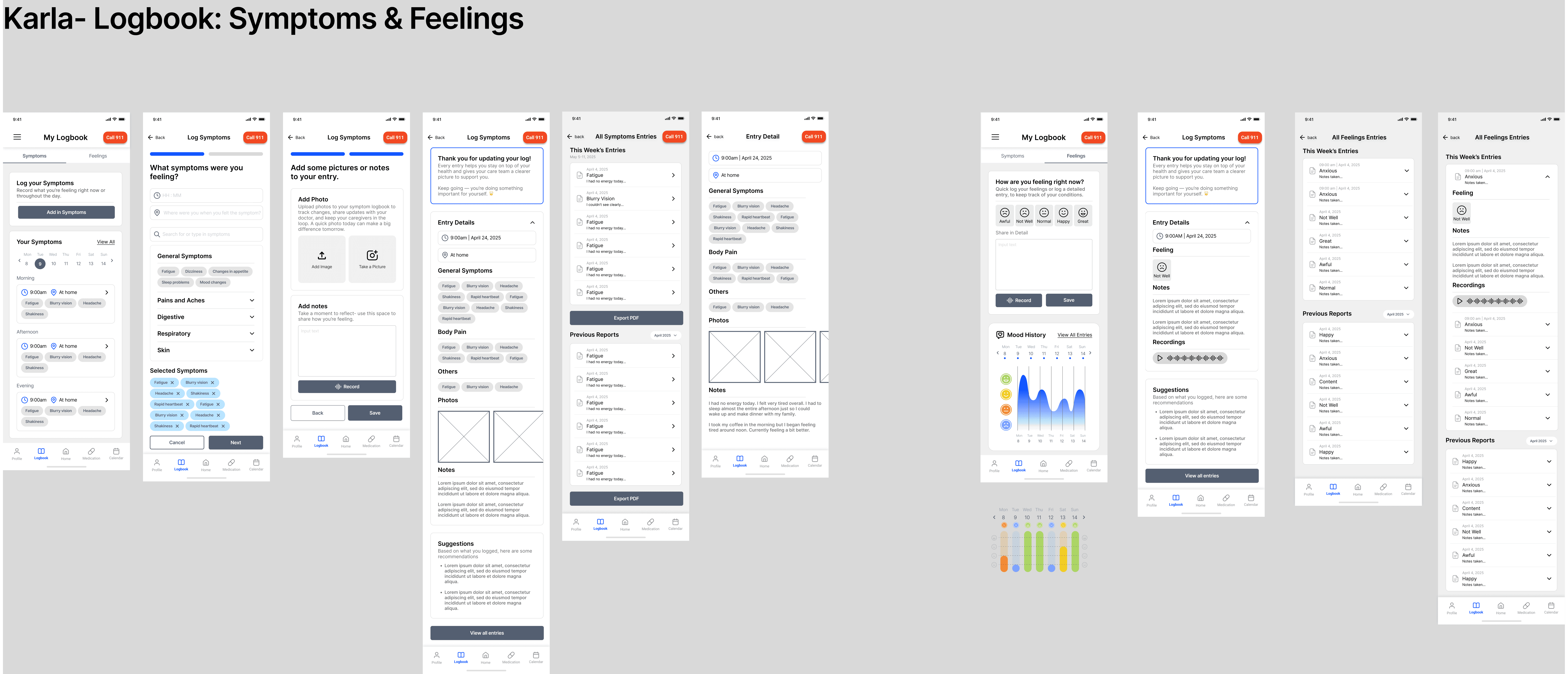
Patient symptoms & feelings logbook complete with multimodal entries, data visulization, and tags
User testing
Testing revealed critical gaps in workflow flexibility for caregivers and information clarity
I recruited participants and we conducted a total of 7 moderated usability tests that ran 45-60 minutes at the mid-fidelity stage to validate our design thinking before investing into refinement.
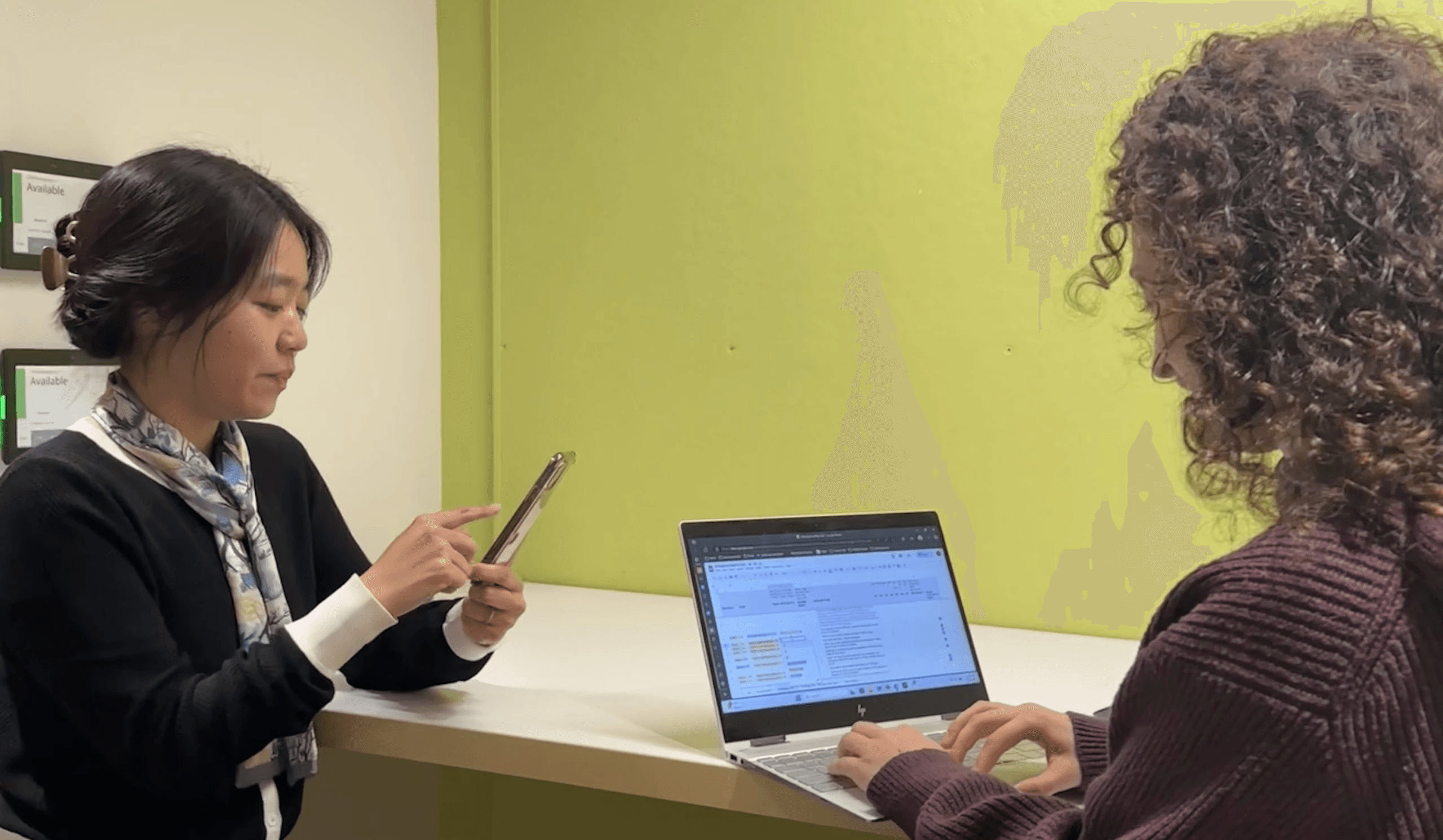
Usability testing session done on mobile
Usability testing session done on mobile
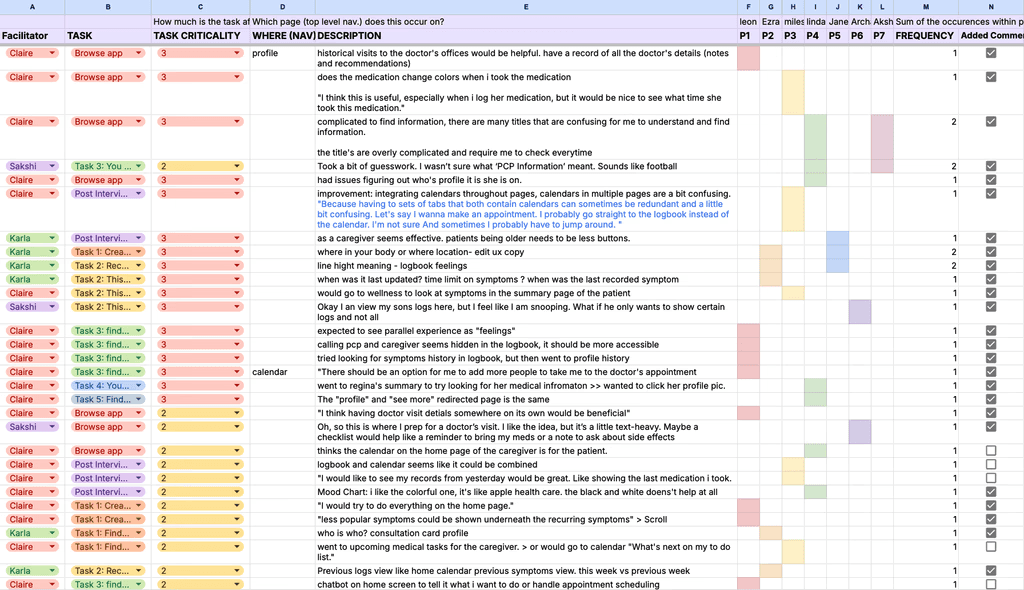
findings consolidated VIa rainbow sheet
findings consolidated VIa rainbow sheet
Through task-based scenarios and follow-up interviews, we identified 5 critical usability issues:
The caregiver view did not clearly distinguish between patient and personal information
Section labels were too ambiguous, making it difficult for users to locate what they needed
Logging symptoms and feelings followed inconsistent patterns
The medication logging feature offered limited flexibility for users' varying needs
Switching between accounts was limited, disrupting the overall workflow
These findings directly shaped our redesigns, namely, informing the visual communication adjusting interaction triggers, and fleshing out specific features.
Final Designs
With the foundation solid, we moved into the final design
By implementing recommendations and incorporating a new style guide, we finalized our designs into high-fidelity solutions.
Creating a style guide means implementing ERbuddy’s brand identity in the format of interface elements, representing the brand while ensuring functionality and accessibility through colors, fonts, and component layouts.
Presenting the new ERbuddy's app…
feature #1
Centralized information for multi-roled caregivers
Caregivers needed a way to manage to manage all the busy roles they were juggling and look after both their own health and their patients. We introduced role-switching that allowed caregivers to:
Monitor patient status from their homepage.
Take actions on behalf of patients without logging out.
Manage their own health information in the same app
Toggle between caregiver and patient viewing via menu
Demo video on how caregivers can access both patient and personal information
My Target Area
Establishing application copywriting
Designing and prototyping symptoms flow
Ensuring alignment with Information Architecture
Designing and prototyping user communication experience
Patient Homepage
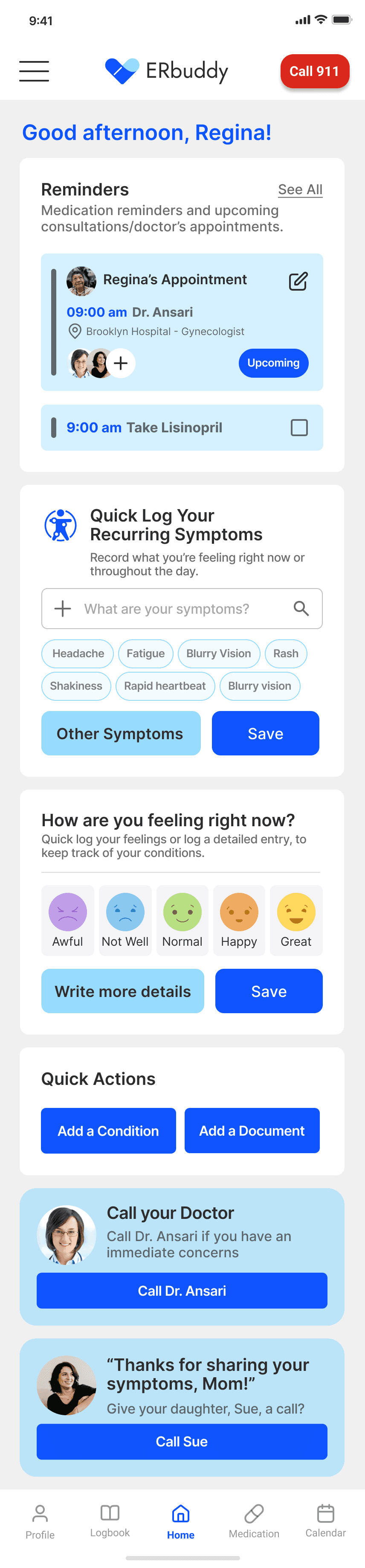
Usability tests confirmed homepage as central hub design choice
Users instinctively returned here to start tasks rather than using other navigation. We designed multiple ways to reach an action
"I would try to do everything on the homepage." - Participant
Timely actions made accessible
Burying reminders in the calendar meant users missed them. We placed them on the homepage too.
Recurring symptoms reduce logging time for chronic conditions that flare regularly.
Quick-log buttons for entries on the go. 'Details' links to comprehensive tracking.
Customized messages makes health tracking feel less clinical and more personalized.
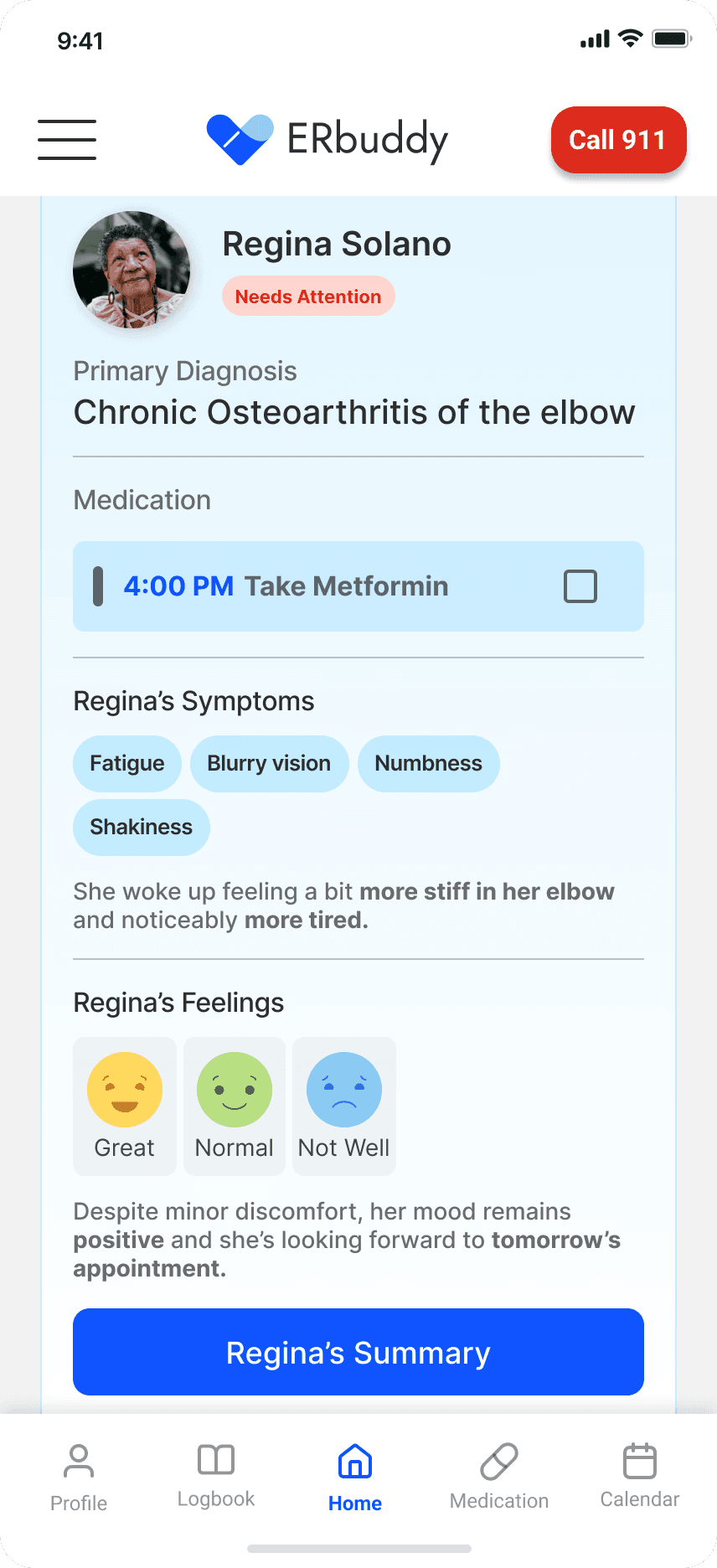
Caregiver Homepage
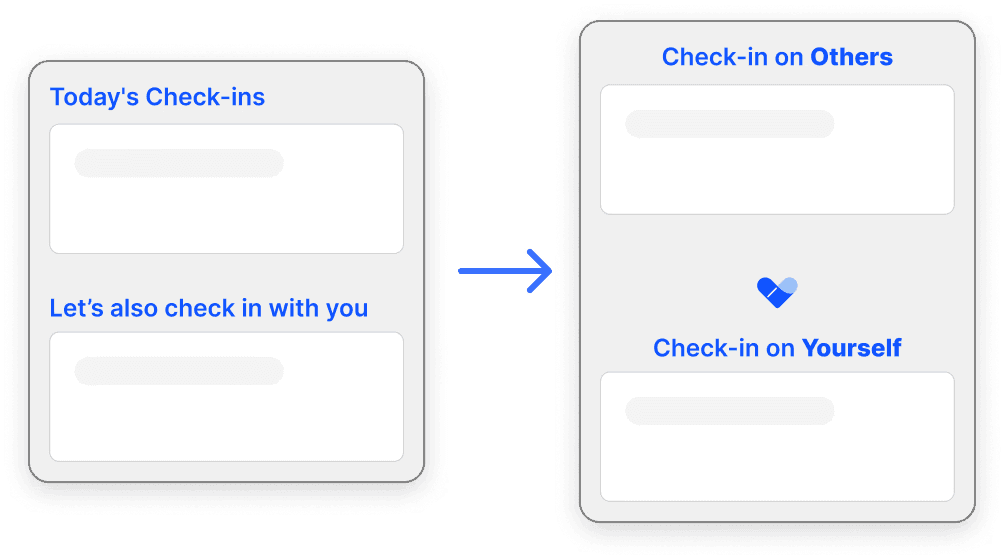
Prior testing showed that users struggled with vague section titles, forcing them to guess where information lived.
We replaced clinical language with clear, relationship-based labels, instead of 'Patients' to reflect how caregivers actually think.
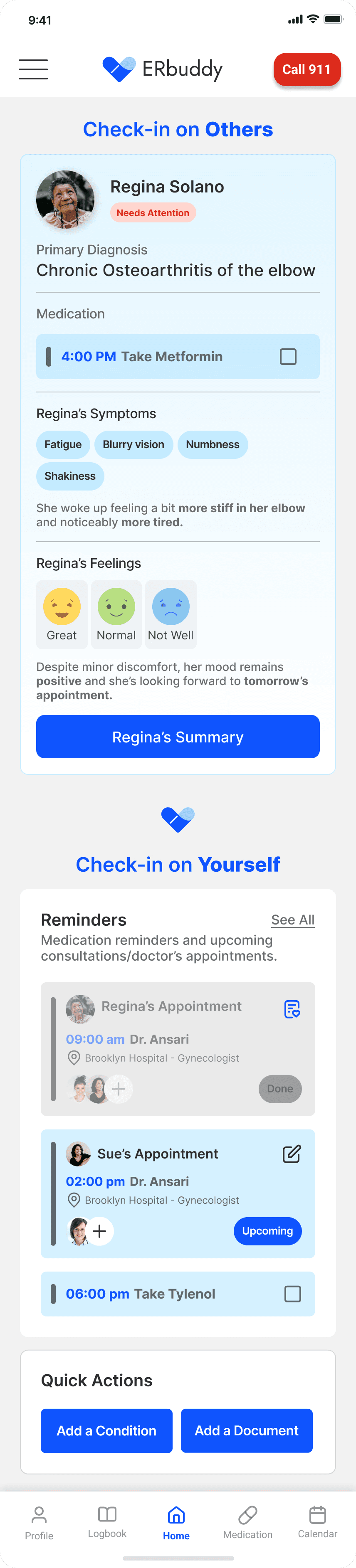
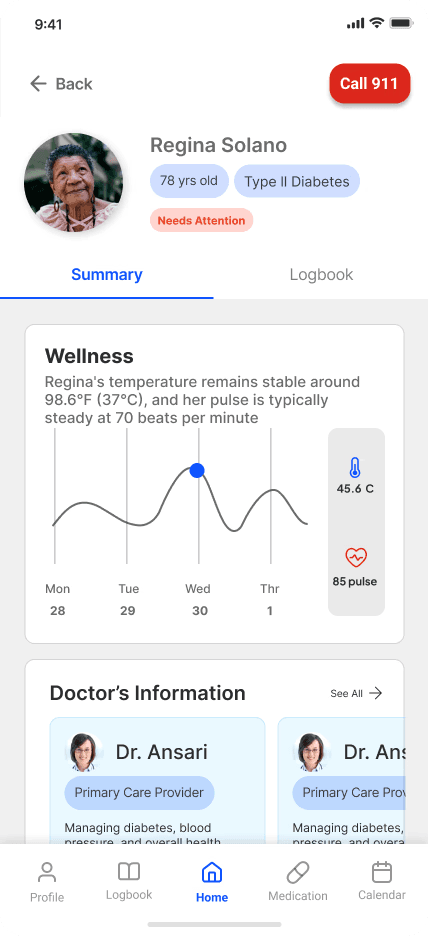
Monitor patient trends at a glance
Early stage interviews revealed untimely communication gaps in patient symptoms, leading to potential emergency situations.
We created a summarized view of diagnosis, medications, symptoms, and mood to help caregivers spot patterns and prioritize care.
Caregivers track their own health
Caregivers can also track their own health without switching between 2 accounts or leaving the app, providing a needed means of managing multiple roles.
Unified view of all reminders
We designed for consolidated information, where both patient and caregiver reminders can be found, eliminating the need to check multiple calendars.
Caregiver account switching flow
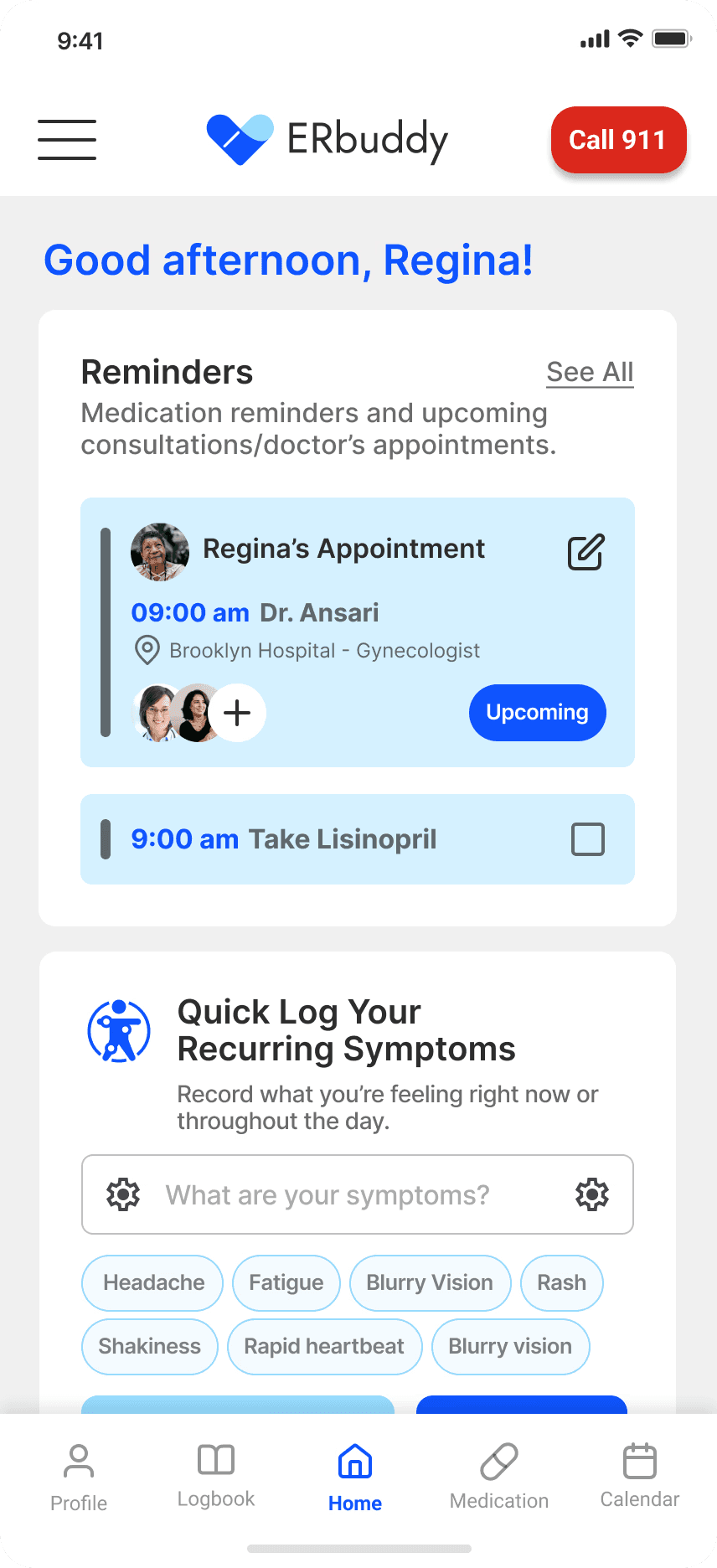
Patient Homepage
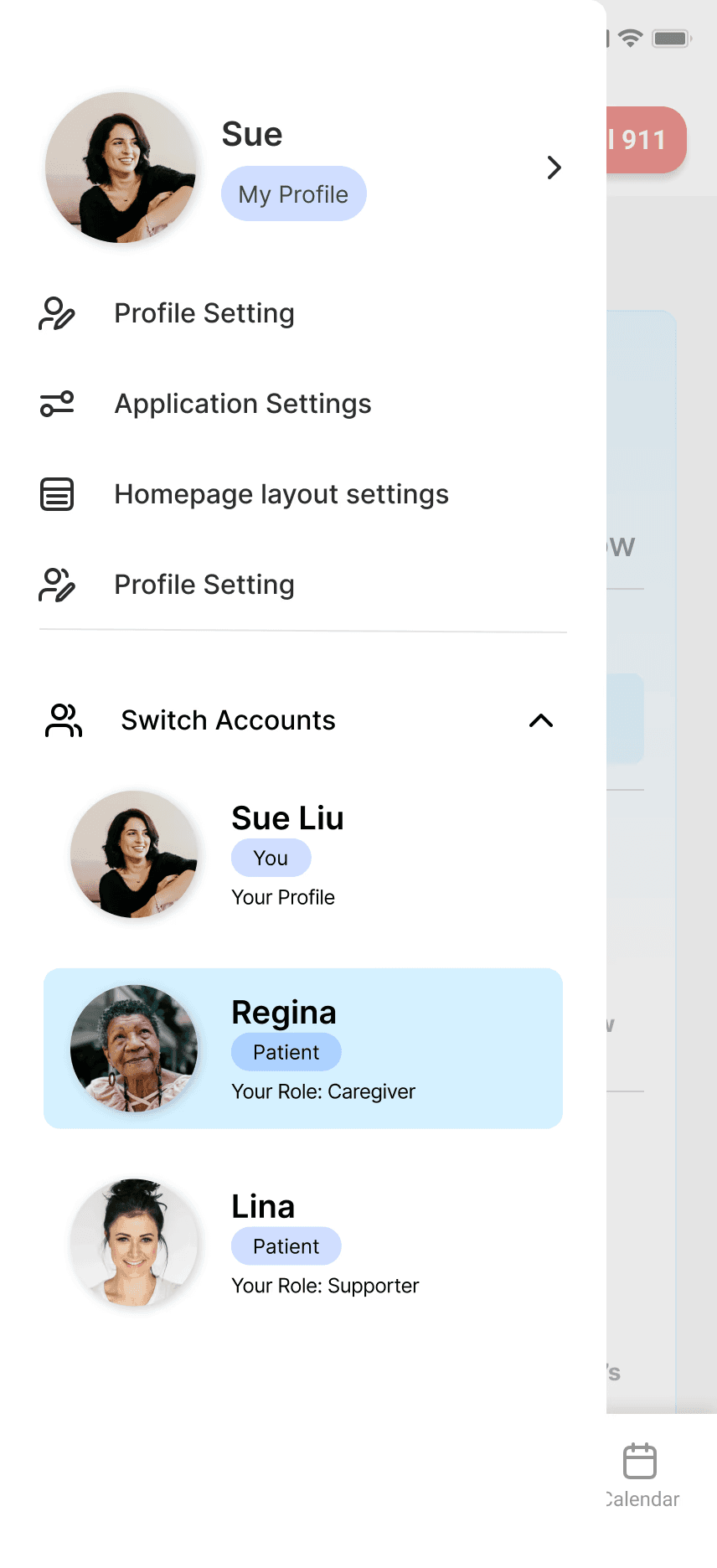
Side Menu- switch account
Caregiver's account
Patient summary
feature #2
Symptoms and Feelings Logbook
They tell me certain symptoms they have a couple days after the fact. So it's hard to kind of understand if it’s a serious thing or not. My mom has been having some heart palpitations, but she won't tell me when she's having it. She'll tell me after she's had it.
Two critical pieces of information surfaced from the data from our interviews:
Caregivers struggled to understand what patients were experiencing day-to-day, making it hard to provide appropriate support or communicate with doctors,
Patients wanted to lead an independent life without feeling like their burdening their caregivers
By addressing these significant concerns, we designed a logbook for up-to-date easy logging that captures both:
Symptoms
Timestamped entries with location, photos, and multi-select options: shareable with caregivers or exportable for appointments.
Feelings
Text or voice notes with AI-generated coping suggestions and weekly pattern tracking.
Demo video on how users can log symptoms and feelings
My Target Area
Designing and prototyping symptoms and feelings log based on user interviews and research
Iterating following user testing sessions
Incorporate AI into experience
Visualizing data
Symptoms Log
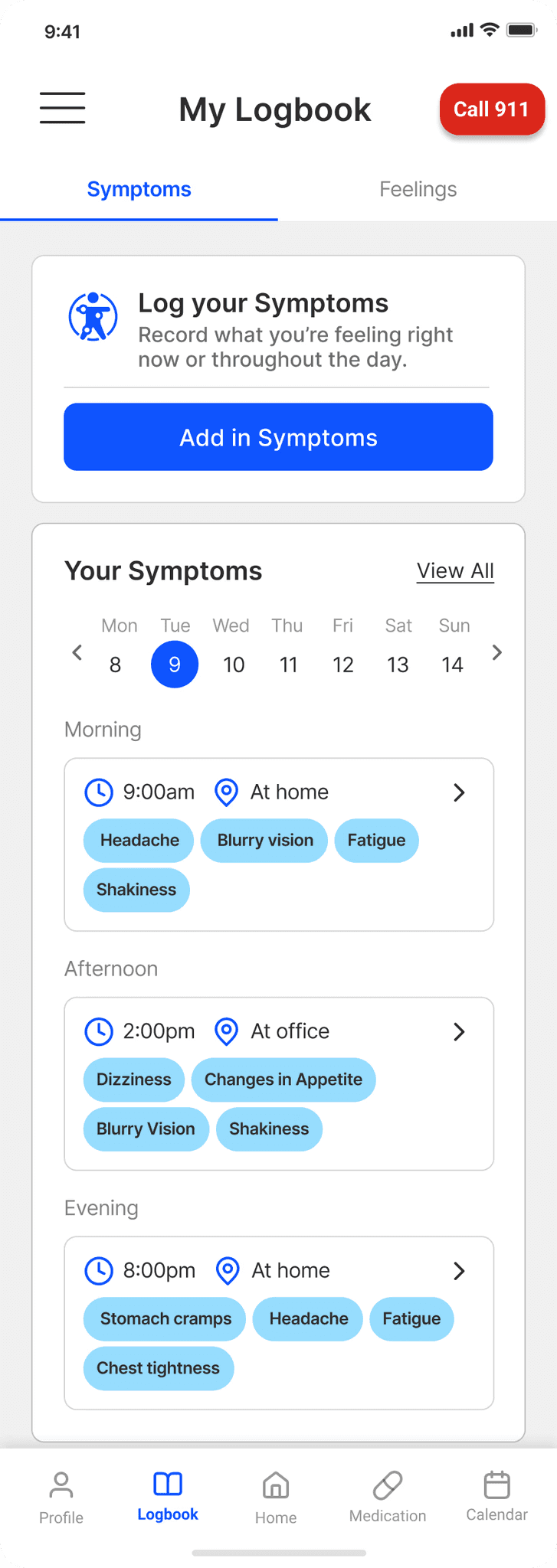
Symptoms grouped by time of day help caregivers and doctors spot patterns
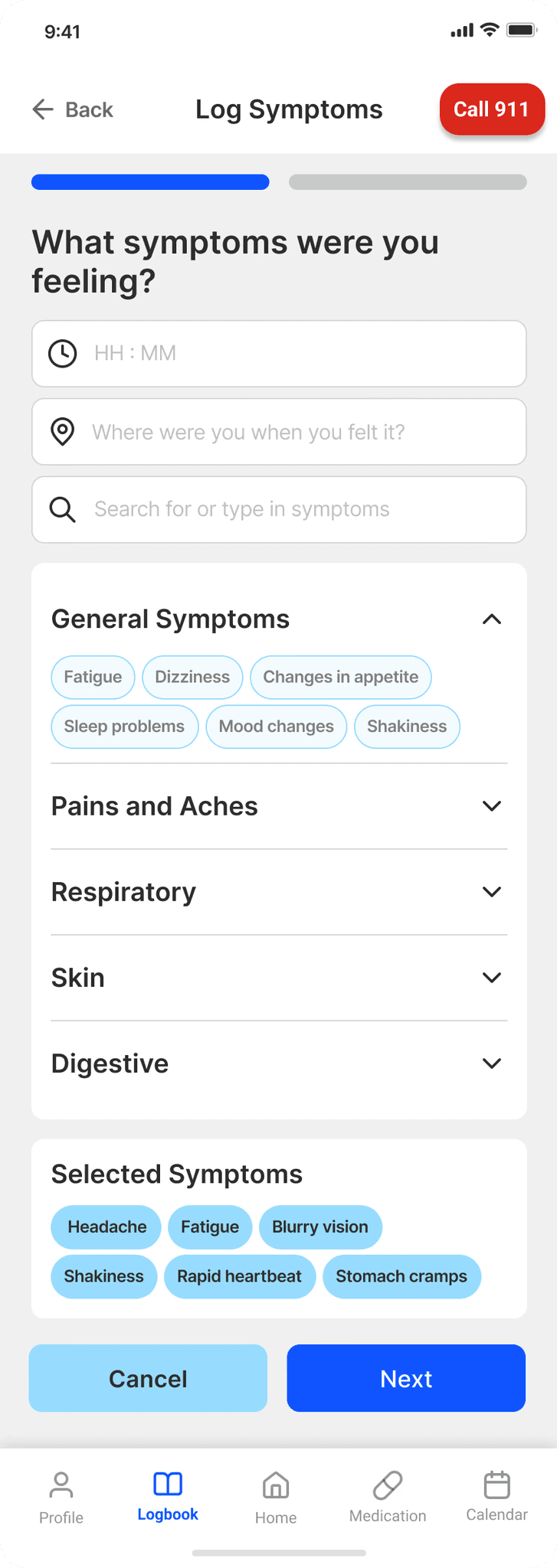
Users were inputting different information due to copywriting.
'Where did you feel this symptom?' confused users so we changed it to 'Where were you?' to clarify.
Feelings Log
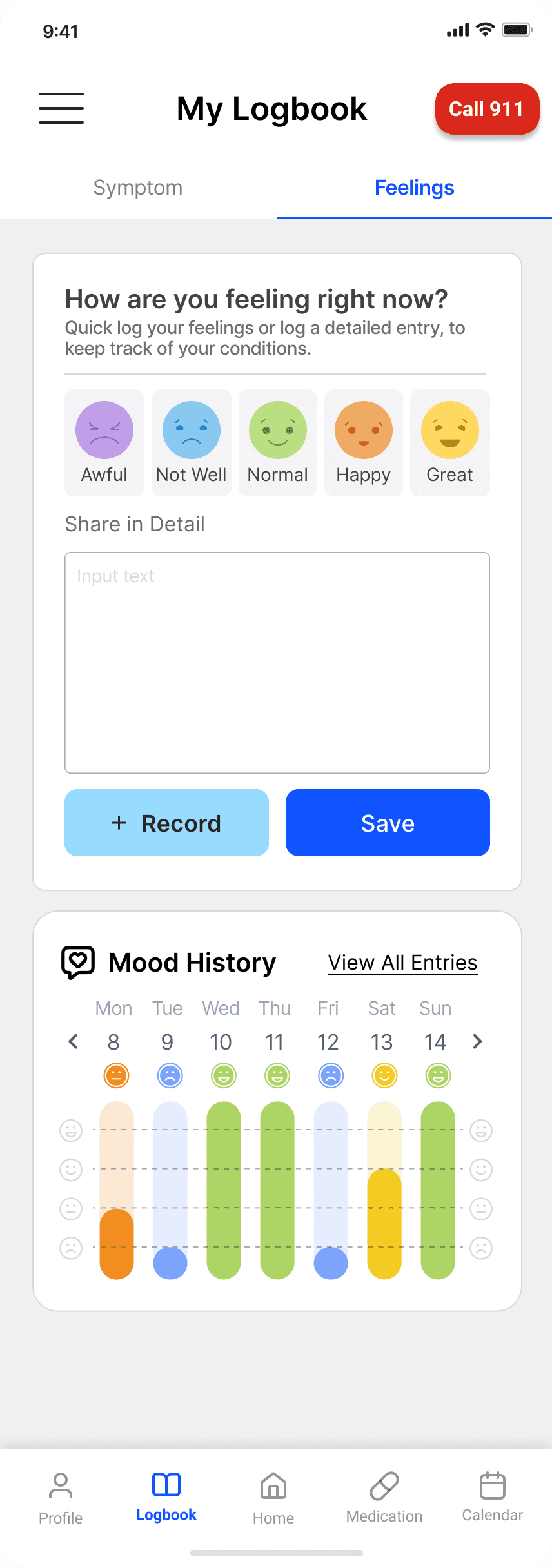
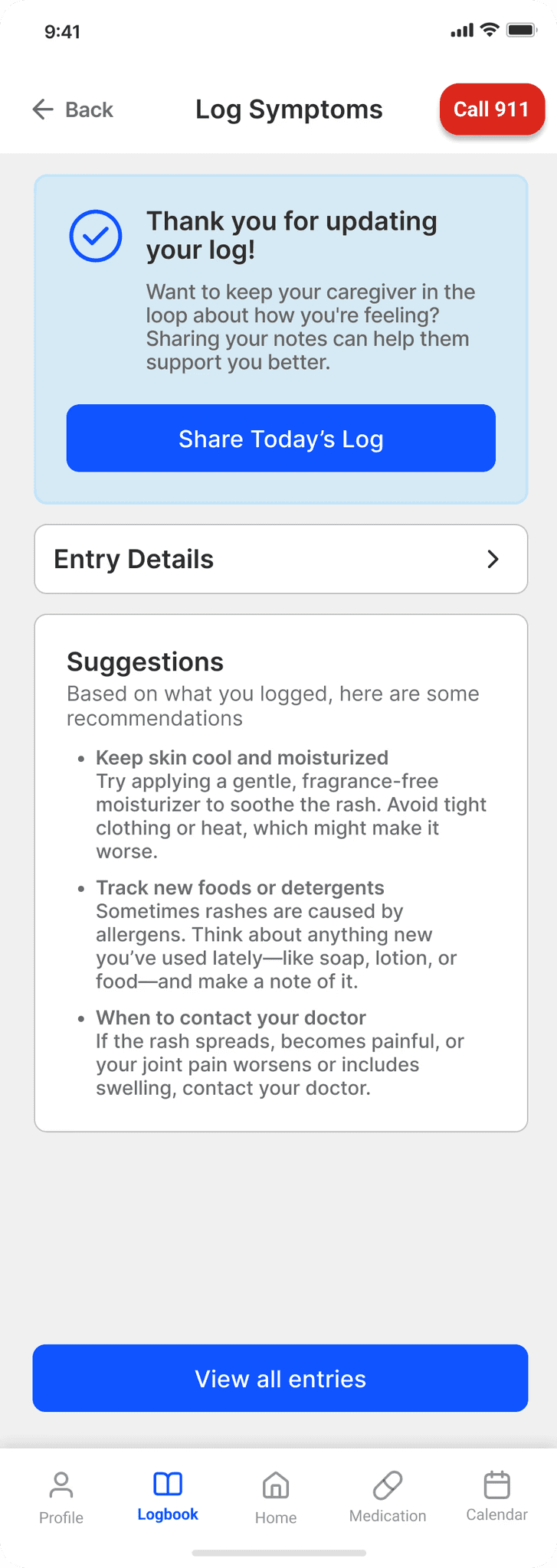
AI-generated coping suggestions offer immediate support for both symptoms and feelings entries.
Note: implementation requires careful attention to medical compliance and data privacy.
Outcomes
Both features and designs are under development
Team ERbuddy reached back out to me to offer an internship, where I worked with them and their development team to implement and further develop the app. Our expected outcomes include:
Lower medical error rates: Reduce the frequency of 'missed dose' errors through high-visibility, persistent notification patterns.
Decreased medical information search time during emergency situations: Through centralized and easy-access to sensitive information, caretakers don't have to spend extra time guessing where important information lives
Improve caregiver satisfaction: Help caregivers feel supported and not overwhelmed. (measured via SUS/ CSAT scales.)
The response to our efforts was met with overwhelming praise and excitement, and is proof of our outstanding design thinking.
"We will most certainly use your insights and hi-fidelity screens to enhance ERbuddy’s Care Managment Platform this summer."
– Ashish, ERbuddy Founder
"Your design team really did a wonderful job with your thorough research capturing the needs and gaps."
– Gurmeet, ERbuddy Founder
Takeaways
What I learned… and what I'll apply
The response to our efforts was met with overwhelming praise and excitement, and is proof of our outstanding design thinking.
1
The importance of documentation
Complex projects require thorough documentation, not just research insights, but the reasoning behind design decisions at every stage. This became essential in our rounds of improvement and during handoff.
2
Ensure Clear Scope Definition
Project management requires defined and shared objectives with both clients and internal teams. Communication and clear boundaries are worth the investment and prevent scope creep later on.
3
Lean into strengths, all hands on deck
Working with this new team was so exciting! Learning about each others' strengths and stepping in when needed helps uplift the whole team move towards a shared goal- everyone learns along the way!
In retrospect, this project was incredibly challenging but as equally rewarding. Healthcare is a complex landscape to navigate, but I learned so much along the way and would do it all over again.